CaTS | Information Technology

CaTS Blog

Reminder: Mandatory Two-Factor Authentication for Students Beginning 1/31/22

Thursday, January 13, 2022

Over the last couple of months Wright State has been subject to multiple attempts by external scammers to gain access into student accounts. Due to these incidents, in addition to both the increasing levels of motivation and sophistication of these scammers, we must put additional security measures in place to reduce risk to the entire university and to students.

As a result, beginning January 31, CaTS will require two-factor authentication for all access to email, WINGS, and WINGS Express. Two-factor authentication is an extra layer of security that requires not only a username and password but also authenticates with a device in your possession (smart phone or key fob/Duo security token).  For those individuals who do not own a smart phone, Duo security tokens can be provided at no cost. To request a security token, please contact the CaTS Help Desk at 937-775-4827.

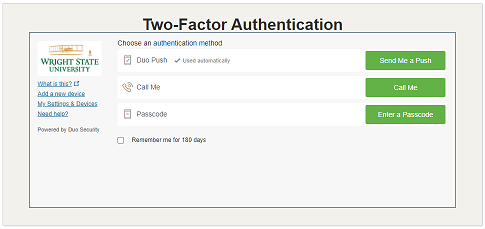
When entering your username and password to connect to the above resources you will see a screen allowing you to select the second method of authentication you would like to use. Your two-factor authentication options as a student are either a passcode or receiving a Duo push.


Instructions on how to use two-factor authentication can be found at https://www.wright.edu/information-technology/two-factor-authentication#instructions. For more information about two-factor authentication, visit https://www.wright.edu/information-technology/two-factor-authentication

We encourage all students to enroll now, before the January deadline. We apologize for any inconvenience these measures may cause, however the risk this presents to the university requires these steps be taken. If you have any questions, please call the CaTS Help Desk at 937-775-4827 or email helpdesk@wright.edu.

Coming Soon: Two-Factor Authentication Mandatory for Students

Tuesday, October 19, 2021

Over the last couple of months Wright State has been subject to multiple attempts by external scammers to gain access into student accounts. Due to these incidents, in addition to both the increasing levels of motivation and sophistication of these scammers, we must put additional security measures in place to reduce risk to the entire University and to students.

As a result, beginning January 31, 2022, CaTS will require two-factor authentication for all access to email, WINGS, and WINGS Express. Two-factor authentication is an extra layer of security that requires not only a username and password but also authenticates with a device in your possession (smart phone or key fob/Duo security token).  For those individuals who do not own a smart phone, Duo security tokens can be provided at no cost. To request a security token, please contact the CaTS Help Desk at 937-775-4827.

 Beginning on Monday, January 31, 2022, when entering your username and password to connect to the above resources you will see a screen allowing you to select the second method of authentication you would like to use. Your two-factor authentication options as a student are either a passcode or receiving a Duo push.

Instructions on how to use two-factor authentication can be found at https://www.wright.edu/information-technology/two-factor-authentication#instructions. For more information about two-factor authentication, visit https://www.wright.edu/information-technology/two-factor-authentication

We encourage all students to enroll now, before the January deadline.  We apologize for any inconvenience these measures may cause, however the risk this presents to the university requires these steps be taken. If you have any questions, please contact the CaTS Help Desk at 937-775-4827, or email helpdesk@wright.edu.

Security Reminder: Remote Computer Access & Support

Monday, September 27, 2021

The Help Desk was recently notified of an IT security threat targeted at a University device, which consisted of a pop-up alert notifying the device’s user that the computer has been compromised, and listed a ‘Microsoft’ number to call for support. Once on the phone, the person on the other end attempted to gain access to the computer remotely to investigate the issue behind the alert. This could have resulted in an opportunity to steal personal, financial, or University information.

Please be aware that pop-ups or alerts like this are a scam, and you should never allow someone calling from an unknown number to access your computer via a remote connection.

While the CaTS Help Desk does offer remote support like this to Wright State members, a CaTS representative will:

  • Call from an internal, Wright State number
  • Identify themselves as a CaTS employee
  • Direct you to the website ‘support.wright.edu’ to initiate the remote connection

If you have questions about any pop-ups or security alerts on your University machine, contact the CaTS Help Desk at 937-775-4827 first. A CaTS representative will then determine the next steps needed to ensure your device and information remains secure.

For more information about IT Security, visit https://www.wright.edu/information-technology/security. To read about the University’s IT Security policies, visit https://policy.wright.edu/policy/11300-it-security-policy.

Quarterly Security Reminder: Fall 2021

Tuesday, September 14, 2021

Welcome to the Fall 2021 edition of the Quarterly Security Reminders email, brought to you by Wright State's Chief Information Security Officer. This quarter's newsletter will provide you with important information about ransomware.

Ransomware: What is it?

The term ransomware has been in the news quite a lot over the past year or so. Many businesses, as well as government agencies and universities, have been significantly impacted by these types of attacks. One notable ransomware attack hit the Colonial Pipeline, which led to its operations being shut down for several days. It has been reported that a ransom of 5 million dollars was paid in order to regain functionality. The federal government recommends not paying such ransoms, but losing access to critical files and systems has left some institutions with no other choice.

Most modern ransomware not only encrypts files on the computer system it infects, it also steals the files and saves them on servers controlled by the perpetrators of the attack. This causes further complications for the university if there is sensitive data contained within the files. This would constitute a data breach resulting in real dollar costs to the university. For instance, this may require us to provide identity theft protection to individuals impacted by the data breach. Additionally, damage to the university's reputation and public image would likely occur.

You might be wondering how you can protect your WSU files and systems against ransomware attacks. There are three key ways to protect yourself:

  1. Check to see that you have SentinelOne installed on your WSU -provided computer. SentinelOne provides protection against ransomware attacks by not only providing advanced anti-malware protection, but also by backing up your files to a location the ransomware cannot reach.
  2. Store your important files on your H, K, or R drives which are backed up nightly allowing those files to be restored should an attack find a way around our defenses.
  3. Remain vigilant against potential phishing emails, as it continues to be the primary method to initiate ransomware attacks against organizations.

SentinelOne

Computer systems distributed by CaTS will have SentinelOne installed at the time the computer is configured for you. Check if SentinelOne is operating on your computer using the steps below:

PC Users: The SentinelOne icon should appear in the hidden icons menu in the bottom righthand corner of your screen.

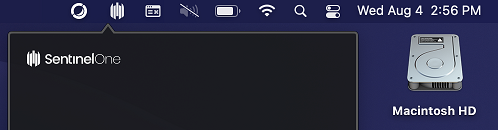
Mac Uers: The SentinelOne icon should appear in the top righthand corner of your screen.\

Additionally, you can contact the CaTS Help Desk at 937-775-4827 and they can quickly check to determine if the program is installed. 

Firewall Upgrade for 7/25

Thursday, July 22, 2021

CaTS will be upgrading the Dayton campus production firewall on Sunday, July 25, beginning at 6 a.m.

During this upgrade, network access along with all university systems such as WINGS, WINGS Express, Banner, etc. will be unavailable between 6–6:30 a.m., with the potential for intermittent network interruptions between 6:30–10 a.m. while we are verifying the upgrade was successful. The public wright.edu websites will continue to be available to off-campus users.

For questions about this maintenance, please call the CaTS Help Desk at 937-775-4827, or email helpdesk@wright.edu.

SecureShare to Replace FileLocker

Tuesday, June 29, 2021

Due to lack of support by the makers of FileLocker, CaTS will be retiring this application on August 2nd, 2021.  It will be replaced with ProofPoint’s SecureShare.  

Beginning July 5th, 2021 please begin using SecureShare to transfer sensitive documents.  SecureShare can be found here: secureshare.proofpoint.com.  FileLocker will no longer be available after August 2nd, 2021.

Faculty and Staff who have regularly used FileLocker will have an account in SecureShare provisioned for them.  Student workers who have a business need to transfer sensitive information can request an account by submitting the following form: https://bit.ly/3y4pXmj

For instructions on how to use SecureShare please visit https://www.wright.edu/information-technology/proofpoint-secureshare.

If you have any questions, please contact the CaTS Help Desk at 937-775-4827, or email helpdesk@wright.edu.

Critical Windows 10 v20H2 Security Update

Thursday, May 6, 2021

Microsoft recently released Windows 10 version 20H2, which offers a set of features for select performance improvements and critical security updates. This new release is critical to ensure ongoing support for the university’s Windows computers.  

CaTS is informing all faculty and staff about this pending change. If you are a Mac user, please disregard this message as it does not impact you.  

What actions do I need to take now?  

Beginning May 6, the Windows 10 v 20H2 upgrade will become available. Visit https://www.wright.edu/information-technology/windows-10-v20h2-upgrade-information for more information, including instructions on how to run the update on your machine.

If you have questions or concerns regarding this update, please call the CaTS Help Desk at 937-775-4827, or email helpdesk@wright.edu.

Quarterly Security Update: Storing Sensitive Data

Wednesday, April 21, 2021

Welcome to the Spring 2021 edition of the Quarterly Security Reminders email, brought to you by Wright State's Chief Information Security Officer. This quarter's newsletter will provide you with information about the proper ways to handle and store sensitive data.

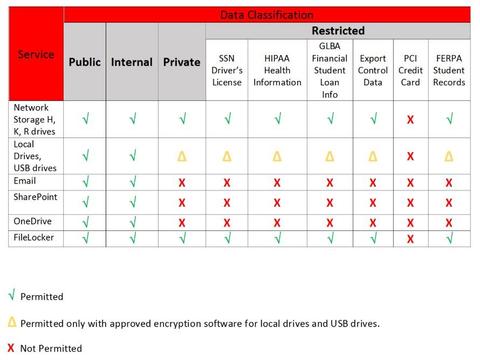
With so many of us working remotely during the Coronavirus pandemic, handling and storing sensitive data, such as social security numbers, student information covered under FERPA, and credit card data, has been a challenge for many of us.  When we do not have easy access to WSU’s network storage (H, K, and R drives) it is very tempting to store data in a convenient location such as Microsoft’s OneDrive or a SharePoint site.  As a reminder that while OneDrive and SharePoint sites are secure, they have not been cleared for the storage of sensitive data.  The type of data mentioned above should only be stored on WSU’s network storage with the exception of credit card data.  Credit card data should never be stored on WSU storage, whether locally on your computer, thumb drive, or on network storage.

Please see the Risk Matrix below:

Risk Matrix Table

If you have any questions on the best way to handle sensitive data, contact the CaTS Help Desk at 937-775-4827, or email helpdesk@wright.edu with your questions.
Reference material can be found at the following locations:

University Data Classification and Risk Matrix
https://wrightstate.service-now.com/sp?id=kb_article&sys_id=a207b44c134e57007e89fabed144b0db

HIPAA Regulations: Uses and Disclosures of Protected Health Information
https://www.wright.edu/sites/www.wright.edu/files/page/attachments/hipaa-regulations.pdf

Student Privacy and Release of Educational Records – FERPA
https://policy.wright.edu/policy/3010-student-privacy-and-release-educational-records-ferpa

Phishing Scam Notice for 3/30

Tuesday, March 30, 2021

The Help Desk was recently notified of an email phishing scam that targets Wright State members. The email appears to come from the address ‘information@wright.edu' with a subject line similar to 'WRIGHT.EDU: Notice of inactive account'.

Please be aware that this is a scam. As always, do NOT click on any links or download any documents that may be contained in this email, and do not respond to this email with any personal information. If you have already clicked on a link and entered any personal information or your Wright State credentials, please reset your Campus 'w' account password immediately.

If you have any questions, or for assistance resetting your password, contact the CaTS Help Desk at 937-775-4827, or email helpdesk@wright.edu.

Phishing: Fake Job Offer Scams

Wednesday, March 3, 2021

CaTS has noticed a recent increase in the number of phishing attempts, specifically fake job offer scams and gift card exchanges, targeting Wright State faculty, staff, and students. Below is information to help keep your Wright State accounts secure:

What are Phishing Scams?

  • Phishing scams are emails designed to trick you into sending an unknown third party your account information or other personal or financial information.
  • These emails may look like they're coming from Wright State, CaTS, your bank or credit card issuer, or any other institution you do business with.
  • The links in phishing emails often take you to a web page that appears to be a WSU site, such as wings.wright.edu. You can avoid being tricked by these fake pages by typing in the URL, such as wings.wright.edu rather than trusting the link.
  • Many email scams often contain fake job offers; if an email contains poor grammar or wording, or seems too good to be true, it most likely is.

How Can You Avoid Phishing Scams?

  • Remember that CaTS, WSU, and other reputable businesses WILL NEVER ask you for any personal information, such as your username and password, via email.
  • Never respond to a suspicious email or click links in those emails.
  • Don't give out your personal information to anyone via email.
  • Don't download attachments from an email unless you trust the sender.

Questions?
If you receive an email and are unsure if the message is a scam, contact the CaTS Help Desk at 937-775-4827. We can help determine whether the email you received is real or not.

Pages