Earlier issues with WINGS Express and Banner 9 Admin have been resolved.
If you continue to experience issues, please call the CaTS Help Desk at 937-775-4827 or email helpdesk@wright.edu.
CaTS Blog
RESOLVED: Issues With WINGS Express and Banner 9 Admin for 1/11/22
Tuesday, January 11, 2022
Current Issues With WINGS Express and Banner 9 Admin for 1/11/22
Tuesday, January 11, 2022
Currently, CaTS is experiencing issues with WINGS Express and Banner 9 Admin.
We are aware of this issue and are working on a resolution. CaTS will notify campus once this issue has been resolved.
Banner Maintenance for 6/6/21
Thursday, June 3, 2021
CaTS will be performing Banner maintenance on Sunday, June 6, from 6 - 10 a.m. During this time, the following services will be unavailable:
- WINGS Express
- Banner Admin
- Student Accounts
- Online Payments
- Wright1 Card Services
- TouchNet
- Appworx
- Parking Services
- Housing Services
- WrightBuy
- Xtender
- uAchieve/DARS
- Printing using Pharos
- eTranscripts
- Banner Workflow
If you have any questions, contact the CaTS Help Desk at 937-775-4827, or helpdesk@wright.edu.
Updates to Banner 9 Admin 5/5/19
Friday, May 3, 2019

On Sunday, May 5, several updates were made to the homepage in Banner 9 Admin, which you can view below. All functionality in Banner 9 Admin will still remain the same.
For more information and to read about these updates, view Application Navigator 3.1.x (PDF)
For general information about Banner 9 Admin, visit https://www.wright.edu/information-technology/services/banner-9-admin.
What's New
The taskbar is now located along the lefthand side of Banner 9 Admin, instead of across the top:
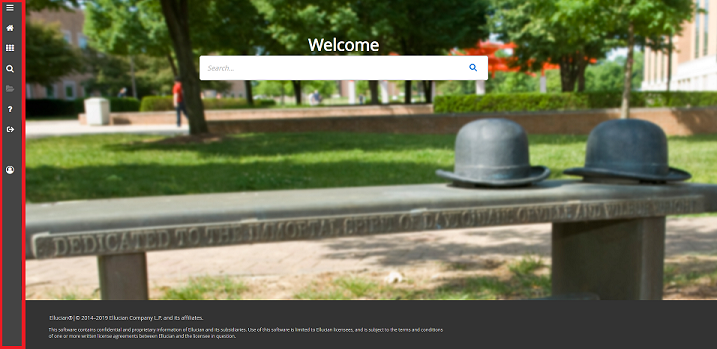
The following icons are located on the taskbar:

Toggle Menu (Red)
Dashboard (Blue)
Applications (Orange)
Search (Green)
Recently Opened (Yellow)
Help (Light Gray)
Sign Out (Pink)
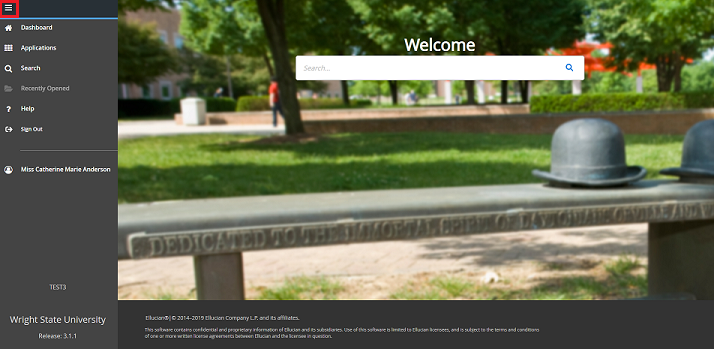
To expand the menu, click on the 'Toggle Menu' icon at the top:
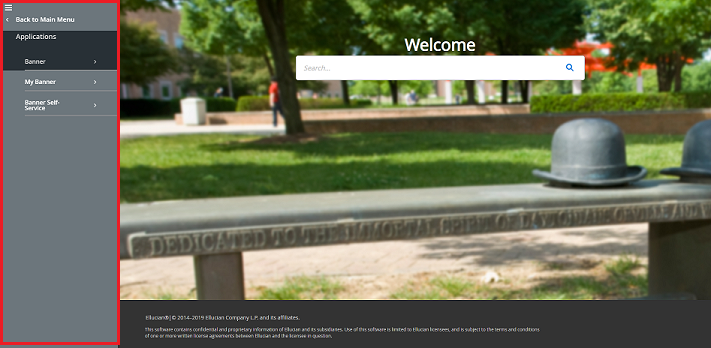
Select the grid icon to open 'Applications'. In this menu you can find both Banner and My Banner:
If you have any questions, please contact the CaTS Help Desk at (937) 775-4827, or email helpdesk@wright.edu.
Banner 9 Admin Updates
Tuesday, May 15, 2018
On Monday, May 14th, Banner 9 Admin was switched to Ellucian's default blue colors on the Banner 9 pages.
The Application Navigator (Home) page will remain Wright State themed, so the Main menu, Search, Recently Opened, etc. options will still reflect Wright State green and gold.
Banner 9 Admin is Available!
Tuesday, March 27, 2018

Wright State Faculty and Staff,
CaTS is excited to announce that Banner 9 Admin is now available!
Banner 9 Admin provides many benefits, including a fresh look and feel, streamlined upgrades and conserved resources, and new administrative pages and reports. It is completely browser based, and does not require Java to run. For best results, use either Chrome or Firefox when working in Banner 9 Admin.
Banner 8 Admin will run parallel to Banner 9 Admin over the next several months to ensure a smooth transition. Please provide any feedback on Banner 9 Admin through this short survey: https://wright.qualtrics.com/jfe/form/SV_2h4vMwy0sEO9ydv.
Accessing Banner 9 Admin
There are several ways to access Banner 9 Admin:
- Login at ban9admin.wright.edu
- In WINGS, click on the Banner 9 Admin link under Services
- Go to https://www.wright.edu/information-technology/services/banner-9-admin and click the green Login to Banner 9 Admin button
General Navigation training is now available; to view and register for training, visit https://www.wright.edu/information-technology/services/banner-9-admin#tr.... If you have questions about training, contact cats-training@wright.edu.
To read more about the transition to Banner 9 Admin including FAQs and updates, visit https://www.wright.edu/information-technology/services/banner-9-admin. If you have any questions, contact the CaTS Help Desk at (937) 775-4827, or email helpdesk@wright.edu.
Banner 9 Admin Training Dates
Thursday, March 15, 2018
Banner Admin User,
Banner 9 Admin training is now available for specific modules! A half hour General Navigation will take place at the beginning of the session, followed by a more targeted training delivered by an expert in that area.
Banner 9 Admin Training Dates:
March
- 3/19: 9-11 (Accounts Receivable)
- 3/27: 2-4 (Accounts Receivable)
- 3/29: 10-11 (Lake Campus)
April
- 4/4: 2-3
- 4/6: 2-3
- 4/10: 2-4 (Finance)
- 4/12: 10-11
- 4/18: 2-3
- 4/20: 2-3
- 4/25: 9-10
- 4/26: 10-12 (Advisors/Colleges)
May
- 5/3: 2-4 (Advisors/Colleges)
- 5/4: 2-3
- 5/8: 2-3
- 5/10: 10-11
- 5/16: 2-3
- 5/22: 2-3
- 5/29: 2-3
Please note that these trainings do not cover Banner Self-Service through WINGS Express. To register for training, visit https://www.wright.edu/information-technology/services/banner-9-admin.
For the latest information about Banner 9, visit our website at https://www.wright.edu/information-technology/services/banner-9-admin.
If you have any questions, contact the CaTS Help Desk at (937) 775-4827, or email cats-training@wright.edu.
Banner 9 Admin General Navigation Training
Monday, March 12, 2018
Banner Admin User,
Banner 9 Admin General Navigation training is now available!
As we approach the transition from Banner 8 Admin to Banner 9 Admin, CaTS will be offering training on the new Banner 9 Admin user interface.
Banner 9 Admin General Navigation Training Dates:
March
- 3/13: 2-3
- 3/15: 10-11
- 3/19: 9-10
- 3/27: 2-3
- 3/29: 10-11 (Lake Campus)
April
- 4/4: 2-3
- 4/6: 2-3
- 4/10: 2-3
- 4/12: 10-11
- 4/18: 2-3
- 4/20: 2-3
- 4/25: 9-10
- 4/26: 10-11
May
- 5/3: 2-3
- 5/4: 2-3
- 5/8: 2-3
- 5/10: 10-11
- 5/16: 2-3
- 5/22: 2-3
- 5/29: 2-3
Please note that these trainings do not cover Banner Self-Service through WINGS Express. To register for training, please visit https://www.wright.edu/information-technology/training/workshops.
If you have any questions, contact the CaTS Help Desk at (937) 775-4827, or email cats-training@wright.edu.
Banner 9 Update for October 2017
Friday, October 6, 2017
The CaTS Banner 9 development team has been working hard the last few months on getting Banner 9 ready for use by the university. See below for the latest updates and preliminary timelines for this important upgrade.
Updates
- A Banner 9 kickoff presentation and open house was held on August 3. All Banner Administrative users were invited for live demos, discussions, and an introductory presentation by Craig Woolley.
- Banner 9 FACT sub-teams have been formed and are meeting on a regular basis. These teams have been doing extensive testing of Banner 9 Administrative pages. Sub-teams represent the following functional areas: Advancement, Admissions, AR, Finance, Financial Aid, HR/Payroll/Budget Planning, and Student.
- An information table about the Banner 9 upgrade was setup at the CaTS Tech Fair on October 4. There was also a live demo of Banner 9 navigation for the administrative applications and a sneak peek at the Banner 9 Self-Service applications.
- Training and documentation for Banner 9 Admin is currently being developed in CaTS. Training sessions for Banner 9 Admin navigation will be announced soon.
Preliminary Timeline for Upgrade
- End of October - Testing of Banner 9 Administrative pages to be completed.
- Mid-November: Soft rollout of Banner 9 Admin in production to a core group of functional administrative users. During this time, Banner 9 Admin and Banner 8 Admin will run in parallel.
- End of 2017 - Rollout of Banner 9 Admin in production to the rest of the campus. Banner 8 Admin and Banner 9 Admin will continue to run in parallel for a short period of time until we are certain that Banner 9 Admin does not have any critical issues.
Banner 9 Upgrade Coming Soon!
Tuesday, July 25, 2017

Wright State Faculty and Staff,
Wright State is commencing the upgrade to Banner 9. This new release delivers a number of important enhancements, including a modern user interface, enhanced navigation and process management tools, and new functionality across the student, HR and finance functions. It will also give us greater flexibility as we’ll be able to run Banner on any browser and on tablets.
With any system upgrade, we know that people often grow concerned over what will change, and we have been working closely with our partner, Ellucian, to understand and anticipate those changes. To date, most of the feedback that other institutions have provided indicates that getting used to the new interface and navigation takes minimal effort. To date, hundreds of Banner customers have already upgraded or are in the process of upgrading, and we will be able to share experiences across the Banner community as we roll out Banner 9 here.
Our team plans to begin the move to Banner 9 by upgrading the various administrative modules in a phased approach. We will start this project in July 2017 and we are targeting completion for October 2018. We will be reaching out to the functional areas to coordinate for system testing and training as we work to complete the overall project schedule. Because we are upgrading the administrative modules, there will be little to no impact on our students.
To see what’s coming check out these quick videos (registration is required):
- Admin – Student (Admissions, Registration, A/R)
- Admin – Financial Aid
- Admin – Human Resources
- Admin – Finance
Here are some additional resources to help you learn more about what’s coming in Banner 9:
- Human Resources Focus – What’s New in Banner 9 (PDF)
- Finance Focus – What’s New in Banner 9 (PDF)
- Student and Financial Aid Focus – What’s New in Banner 9 (PDF)
We will be keeping you informed of our progress through our Banner 9 website, as well as through open discussions with your team, and we welcome your involvement as a part of this initiative. If you have any questions or concerns, I'd be happy to discuss them with you. Please contact me at (937) 775-4008, or craig.woolley@wright.edu.

