Earlier authentication issues for Wright State services such as WINGS and WINGS Express have been resolved.
If you are still experiencing issues, please contact the CaTS Help Desk at helpdesk@wright.edu.
CaTS Blog
Resolved: Login Issues for Wright State Services
Wednesday, February 2, 2022
Current Login Issues for Wright State Services
Wednesday, February 2, 2022
CaTS is currently experiencing authentication issues for online services such as WINGS, WINGS Express, Office 365, and more.
We are aware of the issue and working on a resolution. CaTS will notify the University once this issue has been resolved.
Multi-Factor Authentication for Salesforce Required 2/1/22
Monday, January 31, 2022
Beginning February 1, 2022, Salesforce will be enabling multi-factor authentication for all users.
If you have not yet enrolled your Wright State account in Duo two-factor authentication, visit wright.edu/2fa and click "Enroll Now" to sign up. You will need to be enrolled in two-factor authentication before attempting to access Salesforce on February 1. For step-by-step instructions on how to log in to Salesforce using Duo Mobile, please see the attached document.
If you log in to Salesforce using the login.salesforce.com link, you will be required to download the Salesforce Authenticator app on your mobile phone and connect your account to use multi-factor authentication. For step-by-step instructions, please see the attached document.
If you have any questions, please call the CaTS Help Desk at 937-775-4827, or email helpdesk@wright.edu.
Updates to VDI Authentication
Thursday, January 20, 2022
Beginning January 25, Wright State members will have the ability to choose the "passcode" option as their second authentication method to access their own virtual desktop (VDI) or the remote computer labs.
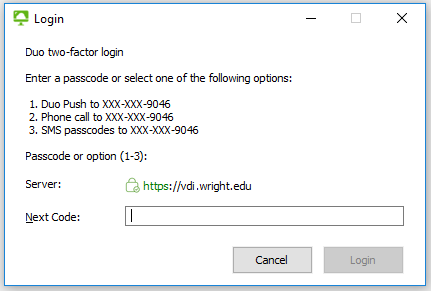
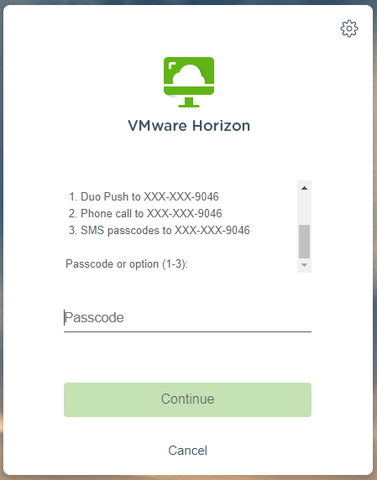
Those using either the VMWare Horizon client or their browser to log in to their VDI/remote labs will now be prompted with a second login screen (pictured below) which allows them to choose between:
- Duo Push sent to mobile device
- Phone call to mobile device/home phone (faculty and staff ONLY)
- SMS passcodes sent to mobile device OR CaTS issued Key FOB
VMWare Horizon Client
HTML/Browser Access
Once you have approved the Duo push/phone call or entered the passcode, the login process will continue as normal.
This upgrade allows for more flexibility when using two-factor authentication to access VDIs and the remote labs from off-campus locations. More information about two-factor authentication can be found at https://www.wright.edu/information-technology/two-factor-authentication; login instructions for personal VDIs as well as the remote computer labs can be found at https://www.wright.edu/information-technology/virtual-computing-labs#instructions.
If you have any questions, please call the CaTS Help Desk at 937-775-4827, or email helpdesk@wright.edu.
Reolved: Network Connectivity Issues for 1/18/22
Tuesday, January 18, 2022
Earlier issues with both wired and wireless network connectivity have been resolved.
If you continue to experience issues, please call the CaTS Help Desk at 937-775-4827 or email helpdesk@wright.edu.
Network Connectivity Issues for 1/18/22
Tuesday, January 18, 2022
CaTS is currently experiencing network connectivity issues, and is working on a resolution. Wireless connectivity appears to be working at this time.
CaTS will notify the University once this issue has been resolved.
Resolved: Issues With Panopto Video Links in Pilot Courses
Friday, January 14, 2022
Previous issues with Panopto video links in Pilot have been resolved. CaTS recommends restarting your browser, clearing the browser cache, and using Firefox or Chrome to access the Panopto videos.
If you are still experiencing issues, please contact the CaTS Help Desk at helpdesk@wright.edu.
Update: Issues With Panopto Video Links in Pilot Courses
Friday, January 14, 2022
CaTS is aware that individuals may still be experiencing issues when trying to access Panopto video links in Pilot courses. We are continuing to work with the vendor to resolve the issue.
Not all courses are affected, however faculty with impacted courses may contact the CaTS Help Desk at 937-775-4827, or helpdesk@wright.edu if they would like a ticket created to alert them of outage updates.
Current Issues With Panopto Video Links in Pilot Courses
Thursday, January 13, 2022
CaTS is currently experiencing issues with Panopto video links in Pilot courses not working properly due to an intermittent error blocking students from utilizing Panopto.
Not all courses are affected. However, faculty with impacted courses may contact the CaTS Help Desk at 937-775-4827, or helpdesk@wright.edu if they would like a ticket created to alert them of outage updates.
RESOLVED: Issues With WINGS Express and Banner 9 Admin for 1/11/22
Tuesday, January 11, 2022
Earlier issues with WINGS Express and Banner 9 Admin have been resolved.
If you continue to experience issues, please call the CaTS Help Desk at 937-775-4827 or email helpdesk@wright.edu.

