CaTS | Information Technology

CaTS Blog

Research Park Network Outage for 8/6

Wednesday, July 31, 2019

On Tuesday, August 6th, from 5 a.m. - 7:30 a.m., all network connectivity will be unavailable in Research Park due to a scheduled power outage on the Dayton campus to perform electrical work.

If you have any questions, contact the CaTS Help Desk at (937) 775-4827, or email helpdesk@wright.edu

Campus Services Network Outage for 7/30/19

Wednesday, July 17, 2019

On Tuesday, July 30th, from 6 - 7:30 a.m., CaTS will be performing a network upgrade in the Campus Services building. During this time, all network connectivity will be unavailable in the Campus Services building, and the buildings listed below.

Other locations that will be affected include:

  • Transportation Services
  • LAR Receiving and Conditioning
  • Soccer Field Press Box
  • Fine Arts Building
  • 69KV Substation (Square D Power Meeting connection only)
  • Physicians Building (Square D Power Metering connection only)
  • Rockafield House
  • Softball Field
  • Mini-University
  • Geology Building
  • Rinzler Sport Complex
  • Shared Services Maintenance Yard

If you have any questions, contact the CaTS Help Desk at (937) 775-4827, or email helpdesk@wright.edu

Allyn Hall Network Outage for 7/27/19

Wednesday, July 17, 2019

On Saturday, July 27th, from 7 a.m. - 12 p.m., CaTS will be performing network upgrade in Allyn Hall. During this time all network connectivity will be unavailable only in this building.

If you have any questions, contact the CaTS Help Desk at (937) 775-4827, or email helpdesk@wright.edu.

Upcoming Panopto Cloud Upgrade/Downtime

Tuesday, July 16, 2019

Please note: the text of this article is quoted directly from an official Panopto outage announcement.


Thursday, July 18: Mandatory Client Upgrade 

The Panopto software service will require Panopto for Windows, Panopto for Mac, and Remote Recorders to be upgraded to version 6.0 or above. The upgrade provides new admin presets and other features (more details here) and will be applied to our WSU Panopto site at 8:00 p.m. EDT.

For more information on the mandatory upgrade, see the article below on the Panopto support site

Saturday, August 10: Downtime

Panopto will be making a number of updates to the Panopto Cloud infrastructure to increase performance and scalability. These updates will require downtime. They expect up to 3 hours of downtime, starting at 9:00 p.m. EDT.

During this downtime, our users will not be able to access recordings on our server, and any attempt to upload from recording clients will result in a "Server unable to connect" message. 

Learn About the Panopto Recorder Upgrade Policy
https://support.panopto.com/s/article/Recorder-Upgrade-Policy


TouchNet Maintenance for 7/16-7/17

Monday, July 15, 2019

On Tuesday, July 16th beginning at 11 p.m., to Wednesday, July 17th at 12 p.m., Wright State's online payment service (TouchNet) will be unavailable due to payment processor maintenance. This maintenance is being performed because TouchNet's backend payment processor is being replaced by a new vendor.

Affected services include:

  • Wright1 Card Deposits
  • Graduation Application
  • Student Account Options
  • Housing Payments
  • Parking Payments
  • Admissions Application Payments

If you have any questions, contact the CaTS Help Desk at (937) 775-4827, or email helpdesk@wright.edu

Updates to Contact Information in WINGS Express

Tuesday, June 25, 2019

CaTS is in the process of improving the self-service Campus password reset function using the 'Password Management' link on the WINGS login page. This change will eliminate the need for security questions, and allow you to reset your password through a process similar to your other personal, non-Wright State accounts.

We want to make sure we have the accurate contact information for you in WINGS Express.

Please take time to review and update your contact information for you in WINGS Express.

To add an external email address, follow the steps below:

  1. Log in to wings.wright.edu with your Campus 'w' username and password
  2. Click on the 'WINGS Express' icon in the top righthand corner
  3. Select the 'Personal Information' tab
  4. Click on 'Update E-mail Addresses'
  5. If your external email address isn't currently listed, select 'External E-mail Address' from the dropdown list next to 'Type of E-mail to Insert' and click 'Submit'
  6. Enter your external, non @wright.edu email address and click 'Submit'

Additionally, please verify there is a current mobile phone number on file for you in WINGS Express. You will also be required to enter your address when adding your phone number.

  1. Log in to wings.wright.edu with your Campus 'w' username and password
  2. Click on the 'WINGS Express' icon in the top righthand corner
  3. Select the 'Personal Information' tab
  4. Click on 'Update Addresses and Phones' 
  5. Select 'Home/Primary' from the dropdown list next to 'Type of Address to Change' and click 'Submit'
  6. Enter your current address and an up-to-date phone number, and click 'Submit'

If your address or phone number ever changes, you will need to follow the steps listed above to update it.

These updates are in preparation for the upcoming move to a single username and password to log in to many systems including WINGS Express and the 'Password Management' service. In the near future, when using the self-service 'Password Management' service you will have the ability to receive a one-time access code sent to an external, non @wright.edu email account,or a cell phone with SMS service.

If you have any questions, or for assistance updating your information through WINGS Express, contact the CaTS Help Desk at (937) 775-4827, or email helpdesk@wright.edu

Systems Unavailable 6/30/19 - 7/1/19

Monday, June 24, 2019

To accommodate the fiscal year end reconciliation, the following systems will be unavailable from 7 p.m. on Sunday, June 30, 2019, until 1 a.m. on Monday, July 1, 2019.

  • WINGS Express
  • Banner Admin
  • Parking Services
  • Wright1 Card Services
  • WrightBuy (Jaggaer)
  • Payments in Salesforce (admissions/orientation)
  • Student Onboarding in Salesforce (admissions)

For questions regarding this maintenance, send an email to helpdesk@wright.edu

Panopto Cloud Upgrade 6/22/19

Friday, June 21, 2019

Please note: the text of this article is quoted directly from an official Panopto outage announcement.


On June 22, 2019, our Panopto cloud site will be upgraded to the latest release, 7.0.

This upgrade will require downtime:

  • Site maintenance will begin at 9:00 pm EDT
  • We expect up to 3 hours of downtime

During the time our site is offline, we will not be able to access recordings on our server and any attempts to upload from clients will result in a 'Server unable to connect' message.


WINGS Express Outage for 5/7/19

Tuesday, May 7, 2019

On May 7th, CaTS will be implementing a security patch causing WINGS Express to be unavailable between 5 - 6 a.m. During this time, you may experience issues accessing:

  • WINGS Express
  • TouchNet
  • WrightBuy

If you have any questions, please contact the CaTS Help Desk at (937) 775-4827, or email helpdesk@wright.edu

Updates to Banner 9 Admin 5/5/19

Friday, May 3, 2019

On Sunday, May 5, several updates were made to the homepage in Banner 9 Admin, which you can view below. All functionality in Banner 9 Admin will still remain the same.

For more information and to read about these updates, view Application Navigator 3.1.x (PDF)

For general information about Banner 9 Admin, visit https://www.wright.edu/information-technology/services/banner-9-admin.

What's New

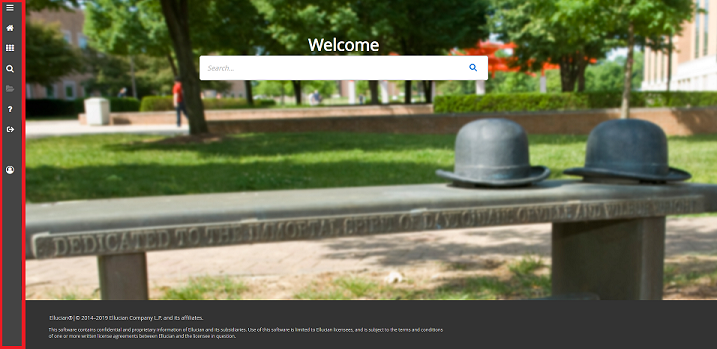
The taskbar is now located along the lefthand side of Banner 9 Admin, instead of across the top:

The following icons are located on the taskbar:


Toggle Menu (Red)

Dashboard (Blue)

Applications (Orange)

Search (Green)

Recently Opened (Yellow)

Help (Light Gray)

Sign Out (Pink)


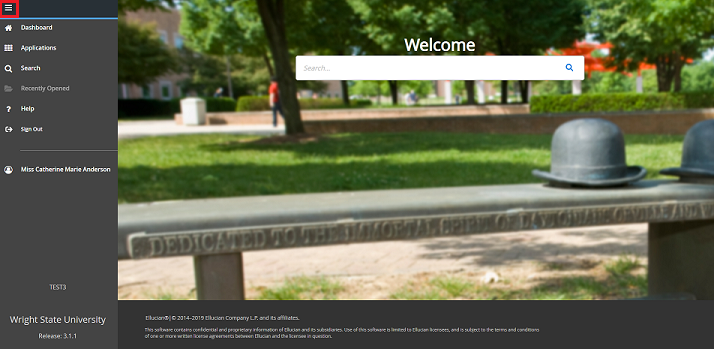
To expand the menu, click on the 'Toggle Menu' icon at the top:

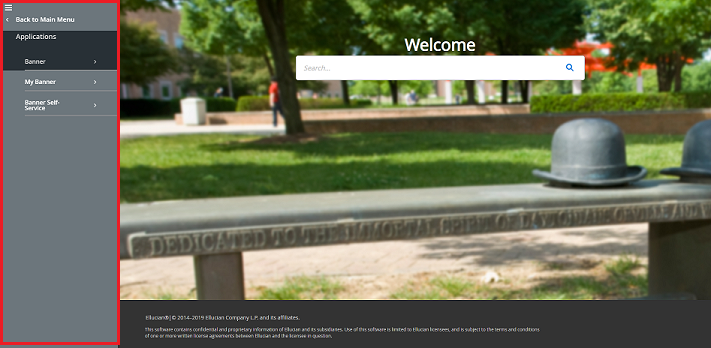
Select the grid icon to open 'Applications'. In this menu you can find both Banner and My Banner:

If you have any questions, please contact the CaTS Help Desk at (937) 775-4827, or email helpdesk@wright.edu.

Pages