CaTS | Information Technology

CaTS Blog

Quarterly Security Update: Fall 2022

Monday, November 14, 2022

Quarterly Security Update: Two-Factor Authentication Exploits

Two-factor authentication is a powerful tool in the prevention of unauthorized access to email, Office 365 applications, WINGS and WINGS Express, etc.  Unfortunately, hackers can trick individuals into giving away information that would allow access to all of our systems, even with 2FA in place.  This is not a theory, it has happened to a few of our users here at Wright State.  I’ll try to explain how this account compromise can take place and how you can protect yourself against being the victim of this type of attack.

This type of attack starts through email.  A phishing email purporting to be from one of WSU’s departments, such as Payroll, is sent to multiple individuals.  The user is asked to login into our payroll system using a link provided in the email.  This link does not lead to any of our systems, but rather to a page which appears to be our standard authentication page.  If the user were to look closely at the URL of this page pretending to be ours, they would find that the page is hosted at a ‘.com’ site rather than a ‘.edu’ site.  This is the first clue something is wrong.

In this scenario the user logs in to what they think is one of Wright State’s systems.  Now the hacker has the individual’s username and password.  The next step is where the 2FA compromise takes place.  The user is sent to a page telling them to provide a one-time pass code from the DUO mobile app. This is another clue that something is wrong.  Our official DUO 2FA page offers several options on how to confirm your identity, such as a DUO Push, one-time passcode, or in some situations a phone call. On the hackers 2FA page the user has no options other than entering a one-time passcode. This should tell you this is not our 2FA page.

If the individual provides the one-time passcode, the hacker now has all they need to gain access to the user’s account.  The first thing the hacker will do is log in to DUO using the stolen username, password, and one-time passcode where they add their telephone as a second method to confirm 2FA requests.  The hacker now has all they need to continue to access any and all systems the user has rights to.

It’s important to pay close attention to the web pages links lead us to.  Take the time to confirm you are on a WSU webpage and not a ‘.com’ page. If you’re unsure if the email is legitimate, contact the department at WSU that the email claims to be coming from. Also, whenever possible, use DUO Push as your method of confirming your identity. The DUO Push authentication method is not subject to this type of attack.
 
Due to the weakness of one-time passcodes we may be forced to disable this option in order to protect the WSU community from such attacks.
Important Information Regarding Sensitive Data in Emails

Thursday, October 27, 2022

CaTS has become aware that many individuals have been submitting Public Service Loan Forgiveness (PSLF) forms via email.  This form includes an individual’s Social Security Number and should not be sent via email.

If you have a need to send sensitive data, such as an SSN, bank account number, etc., please use SecureShare ([secureshare.wright.edu]secureshare.wright.edu) rather than email.  For more information on this service, or to request a SecureShare account, please visit http://www.wright.edu/information-technology/proofpoint-secureshare.

For more information concerning the University’s Information Security policy please review the following, section 11300.10 Email:  https://policy.wright.edu/policy/11300-it-security-policy.

Email Impersonation Scam Notice 9/7/22

Wednesday, September 7, 2022

The Help Desk has recently seen an increase in email phishing scams that target Wright State members by attempting to impersonate Faculty or Staff.

Impersonation emails appear to be coming from a Wright State individual, but are actually coming from an outside email service such as Gmail.

Please be aware that this is a scam. As always, do NOT click on any links or download any documents that may be contained in these emails, and do not respond to this email with any personal information. Please make sure that you check the email address the message is coming from, and verify with the actual Wright State employee if there is a question if they actually sent it. If you ever have concerns or questions, please forward the message to the CaTS Help Desk at helpdesk@wright.edu.

Quarterly Security Reminders: Summer 2022

Tuesday, April 26, 2022

Two-Factor Authentication - Hacking Techniques

Wright State recently made two-factor authentication mandatory for all faculty, staff, and students. This implementation improves our security posture, however as more and more companies implement this technology, hackers are developing methods to get by this security control.

There are currently two methods that are being used to get users to approve a fraudulent 2FA request. They are both similar in nature.

The first method floods a user with multiple 2FA requests in the hope the user will get frustrated and approve one of them.

The second method is subtler, in that the 2FA requests come in slowly over time. Again, the hope is the user will get frustrated and approve one of them.

It’s important to note that none of the above methods will work unless the user’s password has been obtained by the hacker. This emphasizes the need to protect our passwords.

If you experience any of the methods mentioned above, please immediately contact the CaTS Help Desk at 937-775-4827.

Phishing Scam Notice for 3/3

Thursday, March 3, 2022

The Help Desk was recently notified of an email phishing scam that targets Wright State members with the subject line of "Covid-19 Benefits," and appears to come from a Wright State email address.

Please be aware that this is a scam. As always, do NOT click on any links or download any documents that may be contained in this email, and do not respond to this email with any personal information. If you have already clicked on a link and entered any personal information or your Wright State credentials, please reset your Campus "w" account password immediately.

If you have any questions, or for assistance resetting your password, contact the CaTS Help Desk at 937-775-4827, or email helpdesk@wright.edu.

Network Outage for 2/23

Monday, February 21, 2022

On Wednesday, February 23, from 5–7 a.m., CaTS will be performing an upgrade to the campus network which could cause intermittent network outages during this time.  

If you have any questions about this outage, please contact the CaTS Help Desk at 937-775-4827, or helpdesk@wright.edu.

New Weekly Maintenance Window for VDIs

Wednesday, February 16, 2022

In order to maintain effective data security and efficient system performance for our users, CaTS will be instituting a weekly maintenance window for all persistent VDIs. During this time, your system may be unavailable and you should expect that it could reboot.

When is the Weekly Maintenance Window?
Wednesday mornings, between 1–4 a.m.

What Actions Do I Take Now?
When you are done using your VDI for the last time before the next maintenance window is scheduled to occur, please ensure that you save and close out of any applications. You should also sign out of or reboot your VDI, but should not shut it down as this could prevent updates from running.

When Will This Begin?
This maintenance window will begin on March 2 and will remain in effect every week moving forward.

Questions?
If you have any questions or concerns regarding this maintenance window, please contact the CaTS Help Desk at 937-775-4827, or helpdesk@wright.edu.

Multi-Factor Authentication for Salesforce Required 2/1/22

Monday, January 31, 2022

Beginning February 1, 2022, Salesforce will be enabling multi-factor authentication for all users.

If you have not yet enrolled your Wright State account in Duo two-factor authentication, visit wright.edu/2fa and click "Enroll Now" to sign up. You will need to be enrolled in two-factor authentication before attempting to access Salesforce on February 1. For step-by-step instructions on how to log in to Salesforce using Duo Mobile, please see the attached document.

If you log in to Salesforce using the login.salesforce.com link, you will be required to download the Salesforce Authenticator app on your mobile phone and connect your account to use multi-factor authentication. For step-by-step instructions, please see the attached document.

If you have any questions, please call the CaTS Help Desk at 937-775-4827, or email helpdesk@wright.edu.

Quarterly Security Reminders: Spring 2022

Tuesday, January 25, 2022

Revisiting Sensitive Data Sent in Email

In the last year, the Information Security team has turned on a Data Loss Prevention system (DLP system) included in our Microsoft-licensed software. We have found that sensitive data is routinely being sent through email. The data types include Social Security numbers, bank account numbers, and credit card numbers. It is important to note that we are not able to see the content of the emails or attachments. We are only alerted to the type of sensitive data, who originated the email, and who it was sent to.

The majority of these incidents involved a staff member, faculty member, or student including these data types in emails sent to one of Wright State’s departments or an outside agency. At times, an outside agency originates the email. Currently, with the way our DLP solution is configured, we do not have control over what an individual outside of Wright State sends to someone through email. In other words, we are not currently blocking these emails from outside sources. However, each of us does have control over what we do with such emails once they are received. 

If you receive an email containing sensitive data, the best course of action is to remove or redact that data from the email before responding or forwarding the email to others. This would also apply to documents attached to an email. If this isn’t done, the action of resending the email is in violation of our information security policies. If the information is needed for a business process, the data should be stored in a secure location such as your departmental H, K, or R drive.  If you need to send the information to others working at Wright State, use SecureShare (secureshare.wright.edu) to send the information.

Updates to VDI Authentication

Thursday, January 20, 2022

Beginning January 25, Wright State members will have the ability to choose the "passcode" option as their second authentication method to access their own virtual desktop (VDI) or the remote computer labs.

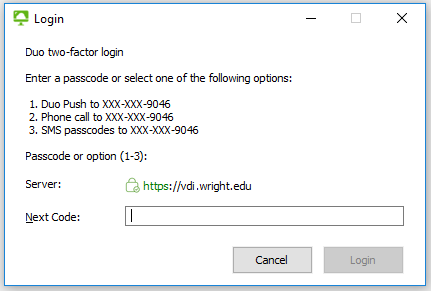
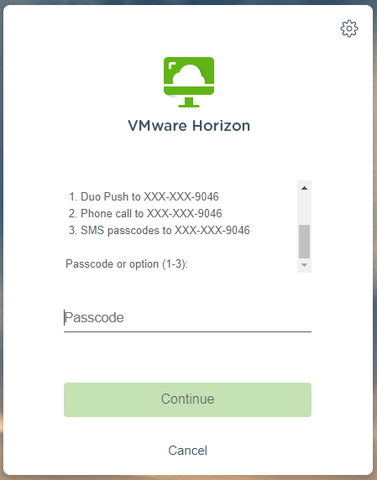
Those using either the VMWare Horizon client or their browser to log in to their VDI/remote labs will now be prompted with a second login screen (pictured below) which allows them to choose between:

  • Duo Push sent to mobile device
  • Phone call to mobile device/home phone (faculty and staff ONLY)
  • SMS passcodes sent to mobile device OR CaTS issued Key FOB

VMWare Horizon Client


HTML/Browser Access

Once you have approved the Duo push/phone call or entered the passcode, the login process will continue as normal.

This upgrade allows for more flexibility when using two-factor authentication to access VDIs and the remote labs from off-campus locations. More information about two-factor authentication can be found at https://www.wright.edu/information-technology/two-factor-authentication; login instructions for personal VDIs as well as the remote computer labs can be found at https://www.wright.edu/information-technology/virtual-computing-labs#instructions.

If you have any questions, please call the CaTS Help Desk at 937-775-4827, or email helpdesk@wright.edu.

Pages

