The CaTS Help Desk was recently made aware that yesterday afternoon a large number of Wright State faculty, staff, and students received an email from an Alexa Brown at Retirement Expert with a subject line of ‘Retirement And Pension Meetings for Wright State University Employees’ indicating eligibility to receive a free consultation for retirement benefits. Please be aware that this message originated from a third-party organization that is NOT affiliated with Wright State University.
Employees are advised to NOT reach out or provide any personal or financial information to them.
If you have any questions regarding this email, please contact the CaTS Help Desk at 937-775-4827, or email helpdesk@wright.edu.
CaTS Blog
Notification of Non-University Sponsored Retirement Message
Friday, January 6, 2023
Important Information Regarding 'Email Bombing'
Tuesday, January 3, 2023
Recently CaTS has noticed an increase in Wright State members who are targets of an IT security incident called 'email bombing'.
What is email bombing?
Email bombing is when an attacker registers your email address with hundreds or thousands of mailing lists.
Why was I targeted for email bombing?
The most likely reason someone is doing this to you is because they are trying to hack your account or overwhelm your inbox with messages so that you don't notice an important email about fraudulent activity. People who deal with financial data are more commonly targeted.
A lot of the emails I am getting have an unsubscribe button. Should I click it?
In general, we don't recommend trying to unsubscribe from mailing lists. Most reputable services that do mailings, won't email more than once unless you have confirmed your subscription. Less reputable services may unsubscribe you, but then sell your address to other services.
Can CaTS, Microsoft, or Google block these emails from being sent to me?
Unfortunately this is difficult because the attacker is not directly emailing you. Instead, the attacker is likely using a bot network of hundreds/thousands of IP addresses that are browsing to legitimate websites, entering your email address, and signing you up to receive a newsletter. Some people want to receive some of these newsletters so we cannot globally block them. We cannot block the emails based on the sender's IP address because they are coming from a legitimate newsletter website. We can block the emails based on keywords in the sender address, subject, or body of the email but we run the risk of blocking legitimate emails if we get the filters wrong.
Questions?
If you have any questions, contact the CaTS Help Desk at 937-775-4827, or email helpdesk@wright.edu.
Quarterly Security Update: Fall 2022
Monday, November 14, 2022
Quarterly Security Update: Two-Factor Authentication Exploits
Two-factor authentication is a powerful tool in the prevention of unauthorized access to email, Office 365 applications, WINGS and WINGS Express, etc. Unfortunately, hackers can trick individuals into giving away information that would allow access to all of our systems, even with 2FA in place. This is not a theory, it has happened to a few of our users here at Wright State. I’ll try to explain how this account compromise can take place and how you can protect yourself against being the victim of this type of attack.
This type of attack starts through email. A phishing email purporting to be from one of WSU’s departments, such as Payroll, is sent to multiple individuals. The user is asked to login into our payroll system using a link provided in the email. This link does not lead to any of our systems, but rather to a page which appears to be our standard authentication page. If the user were to look closely at the URL of this page pretending to be ours, they would find that the page is hosted at a ‘.com’ site rather than a ‘.edu’ site. This is the first clue something is wrong.
In this scenario the user logs in to what they think is one of Wright State’s systems. Now the hacker has the individual’s username and password. The next step is where the 2FA compromise takes place. The user is sent to a page telling them to provide a one-time pass code from the DUO mobile app. This is another clue that something is wrong. Our official DUO 2FA page offers several options on how to confirm your identity, such as a DUO Push, one-time passcode, or in some situations a phone call. On the hackers 2FA page the user has no options other than entering a one-time passcode. This should tell you this is not our 2FA page.
If the individual provides the one-time passcode, the hacker now has all they need to gain access to the user’s account. The first thing the hacker will do is log in to DUO using the stolen username, password, and one-time passcode where they add their telephone as a second method to confirm 2FA requests. The hacker now has all they need to continue to access any and all systems the user has rights to.
It’s important to pay close attention to the web pages links lead us to. Take the time to confirm you are on a WSU webpage and not a ‘.com’ page. If you’re unsure if the email is legitimate, contact the department at WSU that the email claims to be coming from. Also, whenever possible, use DUO Push as your method of confirming your identity. The DUO Push authentication method is not subject to this type of attack.
Due to the weakness of one-time passcodes we may be forced to disable this option in order to protect the WSU community from such attacks.
Email Impersonation Scam Notice 9/7/22
Wednesday, September 7, 2022
The Help Desk has recently seen an increase in email phishing scams that target Wright State members by attempting to impersonate Faculty or Staff.
Impersonation emails appear to be coming from a Wright State individual, but are actually coming from an outside email service such as Gmail.
Please be aware that this is a scam. As always, do NOT click on any links or download any documents that may be contained in these emails, and do not respond to this email with any personal information. Please make sure that you check the email address the message is coming from, and verify with the actual Wright State employee if there is a question if they actually sent it. If you ever have concerns or questions, please forward the message to the CaTS Help Desk at helpdesk@wright.edu.
Quarterly Security Reminders: Summer 2022
Tuesday, April 26, 2022
Two-Factor Authentication - Hacking Techniques
Wright State recently made two-factor authentication mandatory for all faculty, staff, and students. This implementation improves our security posture, however as more and more companies implement this technology, hackers are developing methods to get by this security control.
There are currently two methods that are being used to get users to approve a fraudulent 2FA request. They are both similar in nature.
The first method floods a user with multiple 2FA requests in the hope the user will get frustrated and approve one of them.
The second method is subtler, in that the 2FA requests come in slowly over time. Again, the hope is the user will get frustrated and approve one of them.
It’s important to note that none of the above methods will work unless the user’s password has been obtained by the hacker. This emphasizes the need to protect our passwords.
If you experience any of the methods mentioned above, please immediately contact the CaTS Help Desk at 937-775-4827.
Phishing Scam Notice for 3/3
Thursday, March 3, 2022
The Help Desk was recently notified of an email phishing scam that targets Wright State members with the subject line of "Covid-19 Benefits," and appears to come from a Wright State email address.
Please be aware that this is a scam. As always, do NOT click on any links or download any documents that may be contained in this email, and do not respond to this email with any personal information. If you have already clicked on a link and entered any personal information or your Wright State credentials, please reset your Campus "w" account password immediately.
If you have any questions, or for assistance resetting your password, contact the CaTS Help Desk at 937-775-4827, or email helpdesk@wright.edu.
Quarterly Security Reminders: Spring 2022
Tuesday, January 25, 2022
Revisiting Sensitive Data Sent in Email
In the last year, the Information Security team has turned on a Data Loss Prevention system (DLP system) included in our Microsoft-licensed software. We have found that sensitive data is routinely being sent through email. The data types include Social Security numbers, bank account numbers, and credit card numbers. It is important to note that we are not able to see the content of the emails or attachments. We are only alerted to the type of sensitive data, who originated the email, and who it was sent to.
The majority of these incidents involved a staff member, faculty member, or student including these data types in emails sent to one of Wright State’s departments or an outside agency. At times, an outside agency originates the email. Currently, with the way our DLP solution is configured, we do not have control over what an individual outside of Wright State sends to someone through email. In other words, we are not currently blocking these emails from outside sources. However, each of us does have control over what we do with such emails once they are received.
If you receive an email containing sensitive data, the best course of action is to remove or redact that data from the email before responding or forwarding the email to others. This would also apply to documents attached to an email. If this isn’t done, the action of resending the email is in violation of our information security policies. If the information is needed for a business process, the data should be stored in a secure location such as your departmental H, K, or R drive. If you need to send the information to others working at Wright State, use SecureShare (secureshare.wright.edu) to send the information.
Coming Soon: Two-Factor Authentication Mandatory for Students
Tuesday, October 19, 2021

Over the last couple of months Wright State has been subject to multiple attempts by external scammers to gain access into student accounts. Due to these incidents, in addition to both the increasing levels of motivation and sophistication of these scammers, we must put additional security measures in place to reduce risk to the entire University and to students.
As a result, beginning January 31, 2022, CaTS will require two-factor authentication for all access to email, WINGS, and WINGS Express. Two-factor authentication is an extra layer of security that requires not only a username and password but also authenticates with a device in your possession (smart phone or key fob/Duo security token). For those individuals who do not own a smart phone, Duo security tokens can be provided at no cost. To request a security token, please contact the CaTS Help Desk at 937-775-4827.
Beginning on Monday, January 31, 2022, when entering your username and password to connect to the above resources you will see a screen allowing you to select the second method of authentication you would like to use. Your two-factor authentication options as a student are either a passcode or receiving a Duo push.
Instructions on how to use two-factor authentication can be found at https://www.wright.edu/information-technology/two-factor-authentication#instructions. For more information about two-factor authentication, visit https://www.wright.edu/information-technology/two-factor-authentication.
We encourage all students to enroll now, before the January deadline. We apologize for any inconvenience these measures may cause, however the risk this presents to the university requires these steps be taken. If you have any questions, please contact the CaTS Help Desk at 937-775-4827, or email helpdesk@wright.edu.
Security Reminder: Remote Computer Access & Support
Monday, September 27, 2021
The Help Desk was recently notified of an IT security threat targeted at a University device, which consisted of a pop-up alert notifying the device’s user that the computer has been compromised, and listed a ‘Microsoft’ number to call for support. Once on the phone, the person on the other end attempted to gain access to the computer remotely to investigate the issue behind the alert. This could have resulted in an opportunity to steal personal, financial, or University information.
Please be aware that pop-ups or alerts like this are a scam, and you should never allow someone calling from an unknown number to access your computer via a remote connection.
While the CaTS Help Desk does offer remote support like this to Wright State members, a CaTS representative will:
- Call from an internal, Wright State number
- Identify themselves as a CaTS employee
- Direct you to the website ‘support.wright.edu’ to initiate the remote connection
If you have questions about any pop-ups or security alerts on your University machine, contact the CaTS Help Desk at 937-775-4827 first. A CaTS representative will then determine the next steps needed to ensure your device and information remains secure.
For more information about IT Security, visit https://www.wright.edu/information-technology/security. To read about the University’s IT Security policies, visit https://policy.wright.edu/policy/11300-it-security-policy.
Quarterly Security Reminder: Fall 2021
Tuesday, September 14, 2021
Welcome to the Fall 2021 edition of the Quarterly Security Reminders email, brought to you by Wright State's Chief Information Security Officer. This quarter's newsletter will provide you with important information about ransomware.
Ransomware: What is it?
The term ransomware has been in the news quite a lot over the past year or so. Many businesses, as well as government agencies and universities, have been significantly impacted by these types of attacks. One notable ransomware attack hit the Colonial Pipeline, which led to its operations being shut down for several days. It has been reported that a ransom of 5 million dollars was paid in order to regain functionality. The federal government recommends not paying such ransoms, but losing access to critical files and systems has left some institutions with no other choice.
Most modern ransomware not only encrypts files on the computer system it infects, it also steals the files and saves them on servers controlled by the perpetrators of the attack. This causes further complications for the university if there is sensitive data contained within the files. This would constitute a data breach resulting in real dollar costs to the university. For instance, this may require us to provide identity theft protection to individuals impacted by the data breach. Additionally, damage to the university's reputation and public image would likely occur.
You might be wondering how you can protect your WSU files and systems against ransomware attacks. There are three key ways to protect yourself:
- Check to see that you have SentinelOne installed on your WSU -provided computer. SentinelOne provides protection against ransomware attacks by not only providing advanced anti-malware protection, but also by backing up your files to a location the ransomware cannot reach.
- Store your important files on your H, K, or R drives which are backed up nightly allowing those files to be restored should an attack find a way around our defenses.
- Remain vigilant against potential phishing emails, as it continues to be the primary method to initiate ransomware attacks against organizations.
SentinelOne
Computer systems distributed by CaTS will have SentinelOne installed at the time the computer is configured for you. Check if SentinelOne is operating on your computer using the steps below:
PC Users: The SentinelOne icon should appear in the hidden icons menu in the bottom righthand corner of your screen.

Mac Uers: The SentinelOne icon should appear in the top righthand corner of your screen.\
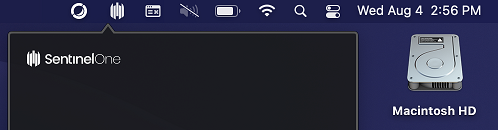
Additionally, you can contact the CaTS Help Desk at 937-775-4827 and they can quickly check to determine if the program is installed.

