CaTS | Information Technology

CaTS Blog

OneDrive for Business

Thursday, June 11, 2015

OneDrive for Business is a Microsoft online service that provides resources for file storage, collaboration, and communication within Wright State's Office 365 system. Please remember that as you use OneDrive for Business, you should not store any files or documents that contain sensitive university data. If you do so, you will be in violation of University Policy 11300, which is the university’s IT Security Policy. See section 11300.03 for further information.

https://www.wright.edu/information-technology/services/onedrive-for-business

Borrow a Laptop from CaTS

Wednesday, May 27, 2015

Laptops2Go is a program that allows students in good standing to checkout a computer with their Wright1Card for 4 hours. Located at the CaTS Help Desk in 025 Library Annex, Laptops2Go allows you to choose whether you want a Mac or a PC in order to best serve your needs as a student. If you need the laptop for longer than the initial 4 hours, the computers can be renewed for an extra 4 hours. 

Adobe Software and New Self-Service Process

Friday, May 15, 2015

CaTS is excited to announce that several software packages are now available to faculty and staff at no charge for use on university-owned computers. CaTS has also implemented a new self-service process to distribute this software, through the utilization of Software Center.


Available Software

  • Adobe Acrobat Pro 11
  • Adobe Creative Cloud (Photoshop, Illustrator, Premiere, etc.)


Coming Soon

  • Microsoft Office, SAS, SPSS, STATA, and MatLab


Software Center

  • Software Center allows for self-service software installations.
  • Software Center allows CaTS to report usage of software to optimize licensing costs.


Windows users: Software Center is now available.

  • To determine if you have Software Center, go to your 'Start' menu, select 'All Programs', and Software Center will be listed if available.
  • If you don't see Software Center on your Windows PC, please call the Help Desk for assistance with installing the software.


Mac users: Software Center for Mac is coming soon; in the mean time, please call the Help Desk for assistance with installing the software.


For additional details please visit:

https://www.wright.edu/information-technology/services/software-center

Microsoft Lync Now Skype for Business

Thursday, May 14, 2015

Microsoft Lync will become Skype for Business on all university-owned
Windows computers connected to the Wright State network on Monday, May 18.

-Skype for Business will install automatically on your computer.

-Skype for Business combines the functionality of Lync with the Skype
interface.

-Familiar features like video chat, instant messaging, and desktop
sharing are available in Skype.

-All of your Lync contacts will be available in Skype for Business.

-Skype for Business is not yet available for Macs. Please continue to
use Microsoft Lync 2011 until further notice.

To read more about Skype for Business, visit this website:
https://www.wright.edu/information-technology/services/skype-for-business.

Podium Shift

Monday, April 6, 2015

By Seth Bauguess


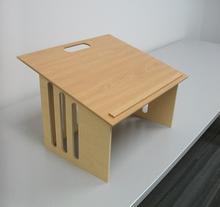
Next fall, sharp-eyed Wright State University students may notice a change at the head of the classroom: smaller, lighter tabletop podiums in place of the heavier, mismatched podiums that professors have lectured from for decades.

The project began back in 2012 when word from faculty began to surface that many of the older podiums were in disrepair and not as functional in classrooms settings that increasingly needed to be flexible.

“Our podiums were old, cumbersome and just didn’t match,” said Debbie Whisler, supervisor of classroom technology support. “We began gathering information for a solution.”

The Classroom Technology Support department within Computing and Telecommunications Services (CaTS) took the challenge and found an answer when Mateen Rizki, Ph.D., engineering professor and chair of the Department of Computer Science and Engineering, suggested that engineering students working on their senior design projects might be able to help.

Engineering students investigated usability characteristics known as human factors and surveyed faculty for design input. Eighty designs were trimmed to five finalists. In the end, faculty members chose the design they felt would work best. They felt the design by engineering graduate Trent Williams ’14 was the best solution.

“This collaborative approach to solving university issues by engaging with different service departments as well as academic departments is something I hope continues across campus,” said Whisler.

So far 15 prototypes are being used, but the goal is to collect feedback from faculty and students before replacing all of the old podiums by the end of the Summer Semester.

Faculty, staff or students can share their feedback about the prototypes by emailing helpdesk@wright.edu.

Local woodworking company Cassidy Woodworks has been commissioned to build the podiums.

“This was such a satisfying project because we saw the benefits of getting students engaged in solving real-world problems, but at the same time we worked with faculty and staff to deliver a solution that works for them too,” said Whisler.


Announcing Office 365 Sites

Sunday, February 15, 2015

On January 26, 2015, Office 365 Sites will become publicly available to all university faculty, staff, and students. Office 365 Sites are online communities supporting university organizations, projects and other Wright State-related functions.  Within these Office 365 sites/communities, you can then share files, calendars, and other important information with any other members of the site, just as you may have in the past with WINGS Group Studio.

Office 365 Sites are a great choice if you want to share information for longer periods of time. For example, you may want to create an Office 365 site for your department, college, or committee.

To browse available sites for membership, or to request your own site, simply log in to your Office 365 Outlook Web App (the online version of your email, calendar, etc.) and click on the “Sites” button on the top toolbar.

To learn more about Office 365 sites, including information on how to request a site, see our documentation website available at
https://www.wright.edu/information-technology/services/office-365-sites. Also note that CaTS will be soon be offering training for Office 365
Sites. Watch your inbox for dates and more information.

If you have any questions, please contact the CaTS Help Desk at (937) 775-4827, or toll free at 1-888-775-4827.
 

Microsoft Lync

Thursday, January 1, 2015

Microsoft Lync is an instant messaging client that gives you instant messaging capabilities, voice and video chat, screen sharing, and more. There are numerous versions of Lync that are available to use with your WSU Office 365 account. Lync 2013 is available for Windows and mobile devices, while Lync 2011 is available for Macs. A version of Lync, called Lync Online, is also available after logging in to Outlook Web App (your web-based email and calendar). See below for links to pages about each of these versions. If you have questions about Lync and its use at WSU, please contact the CaTS Help Desk.

https://www.wright.edu/information-technology/services/microsoft-lync

Upcoming Changes to Your Office 365 Account

Sunday, December 21, 2014

Changes are coming to your Wright State Office 365 account! If you have questions about any of these topics, please contact the CaTS Help Desk at (937) 775-4827, or toll free at 1-888-775-4827.


Changes to Outlook Web App Appearance

If you use Outlook Web App (the online version of your Office 365 email and calendar) you’ll notice there’s a blue bar at the top of the page. On December 15, 2014, this bar will change from blue to green. It’s important to note that none of your email or calendar events will be impacted by this change.


Also, CaTS wants to make you aware of another change coming soon to your Outlook Web App. Microsoft will be changing the location of buttons that link to various services, such as Calendar, People, etc. Instead of those being on the top right, they will be moved into a grid located on the top left. Clicking on this grid provides you with a list of services available to you. Here's a screenshot of the new look with the grid highlighted in red.
 
Groups

Groups is a new feature that will appear soon within your Outlook Web App. A group is a shared workspace for email, conversations, files, and calendar events where group members can conveniently collaborate and quickly get stuff done. More information about Groups will come soon once the service has launched.
 

Social Engineering

Monday, December 8, 2014

Social engineering is the art of people manipulating others so they will give out confidential information. When criminals are selecting targets, they try to design scams that will trick you into giving your passwords, bank information, or access to your computer (usually to install malicious software, such as viruses). Find out more information through the link below in order to protect yourself from this recent security threat. 

https://www.wright.edu/information-technology/security/social-engineering

Your Wright State App Questions Answered

Monday, October 6, 2014

This page answers the most common questions asked about the Wright State app through the app's feedback form. You can also find the satisfaction rates for the app, based on numbers from the feedback form. If you have the app and would like to submit feedback, simply tap on the "Feedback" link under the "Services" menu.

Satisfaction Rates

As of September 3, 2014, CaTS has received 175 completed feedback forms. Here are the satisfaction ratings from that feedback.

Very Satisfied: 59

Satisfied: 87

Neutral: 22

Unsatisfied: 6

Very Unsatisfied: 1

FAQs

Pages