On this page:
About JAMF/Casper
- JAMF/Casper is a software program on the Mac that allows for the delivery of Mac software over the Wright State Network. JAMF/Casper is similar to Software Center on Windows.
- JAMF/Casper allows for self-service software installations.
- JAMF/Casper allows CaTS to report usage of software to optimize licensing costs.
Mac Users: JAMF/Casper is ONLY available for Univeristy-owned computers.
Available Software
Below is a list of all available software through JAMF/Casper. For a complete list of all software available for University purposes, visit the University Software page.
- Acrobat Creative Cloud Desktop App | Used to download/install other Adobe apps
- Apple GarageBand
- Apple iMovie
- Apple Keynote
- Apple Numbers
- Apple Pages
- Apple Xcode
- Audacity
- Camtasia
- Cisco AnyConnect Secure Client VPN
- Cisco Webex
- FileMaker Pro (ONLY BSOM)
- Google Chrome
- Mathematica
- MatLab
- Microsoft Office 2024 (Excel, Outlook, PowerPoint, & Word)
- Microsoft OneDrive
- Microsoft Teams
- Mozilla Firefox
- Read & Write
- SentinelOne
- Snap & Read
- SPSS
- STATA
- VLC Media Player
- VMware Horizon Cient (VDI Client)
Self Service
-
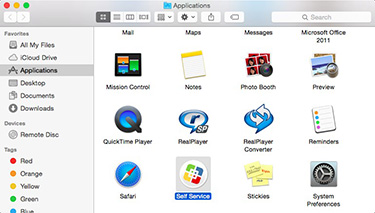
Open your Applications folder.
-
Click on the Self Service icon.
-
Login with your campus "w" username and password.
Installing Software
-
Open JAMF/Casper and login with your campus "w" username and password.
-
Select the software you want to install. Click Install on the pop-up screen.
-
The software will automatically begin installing. You can check the progress of the installation at the top of the Self-Service screen.